Welcome to the Clubhouse.
Mission 01 · Your bundle game plan
Everything you need to build your bundle. Nothing you don't.
Before we open a single template, let's agree on how we're going to do this.
My tech philosophy
Your first bundle doesn't need to be your fanciest bundle.
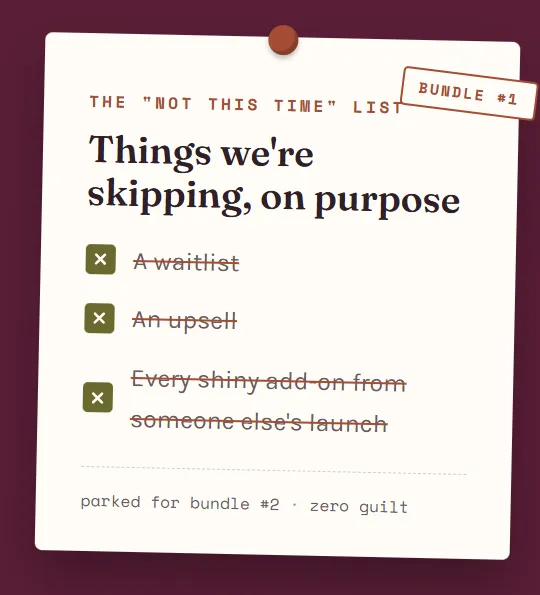
Here's what happens when we try to do everything on round one: we add a waitlist. Then an upsell. Then a VIP upgrade, a countdown timer, a 14-email sequence, and a tech stack held together with Zapier and prayer.
And then we're exhausted. And the bundle never launches.
So we're not doing that.
If this is your first bundle, we do the basics. A simple setup that gets you awesome results: new subscribers, real connections, and proof that you can absolutely do this.
I don't add. I remove. Everything on your plate this round is there because it works, not because someone else's launch had it.
done and launched beats perfect and parked.
01 · This bundle
Learn the basics
One simple setup. Follow along, step by step. No guessing, no "go figure it out."
02 · Get comfortable
Master them
Learn why each piece works, so it stops feeling like magic and starts feeling like yours.
03 · Next bundle
Add on if you want
Need a waitlist? Curious about an upsell? Now you're ready, and it's a choice, not a panic.
Five weeks is the minimum. More is better.
Got a full schedule? Give yourself more room. This is the floor, not the goal. Pick your start date and add weeks wherever you need them.
Mission 01 · Your bundle game plan
Build your bundle.
One step at a time.
Two parts. Part 1, we set it up and invite your experts. Part 2, we build everything they'll share.
Tick each step off as you go. Your progress shows up on the card.
Want 20 experts? Invite 100.
Not everyone will say yes, and that's totally normal. Pick how many experts you want in your bundle, and I'll tell you how many invitations to send.
to land about 20 experts in your bundle.
Why 5×? Roughly 1 in 5 experts says yes. People are busy, inboxes are full, timing isn't always right. A "no" (or no reply) isn't personal. It's just math, so plan for it.
part 1, done. your crew is coming together. ✨
PART 1 Set it up & invite your experts
Step 01
Make your decisions
A quick word before you start: decide, don't stall.
Here's the truth about this page: the decisions on it aren't the hard part. The deciding is.
Most bundles don't die because someone picked the "wrong" theme. They die in the "let me think about it" phase, the one that quietly stretches from a Tuesday afternoon into next quarter. 😬
So before you dive in, a little permission slip:
None of these decisions are forever. You're not carving them into stone, you're writing in pencil. Pick a title (you can tweak it). Choose a date (you can adjust it). The only decision that actually costs you is the one you keep not making.
Done beats perfect. A "good enough" bundle that actually launches will grow your list. A "perfect" bundle that lives in your head will not.
So here's how we do this
Give each decision a few minutes, not a few days.
If you're about 80% sure, that's your answer. Circle it and move on.
Set a timer if you have to. When it dings, you decide.
Messy and moving beats tidy and stuck. Every single time.
you already know more than you think. trust it, pick, and let's go build something. 🙌
Step 02
Create Your Funnels
Why first?
Because you need to know everything your funnel needs before you build your Expert Form. That way, the form asks experts for exactly what your pages need.
Nothing is worse than wanting your funnel to look one way, and not having the information to make it happen.
Part of The VIP Hub? Skip the build. Email me at [email protected] (or drop in the chat) and I'll put my template right into your account.
See the example pages
Follow along: update your funnel for a new bundle
In this video, I'm updating my own bundle funnel for a brand-new bundle, step by step, exactly how I'd do it on a normal Tuesday. Pause whenever you need to and do each step right alongside me. By the end, your opt-in page, gift page and "Oh no, you missed it" page will all be ready for your new bundle, without building a single page from scratch.
Step 03
Create your Expert Form
What is it?
You're about to invite experts to collaborate with you. When it's time to add their info to your funnel, you want everything you need, up front, in one place.
What we're NOT going to do? Go back and forth a hundred times with 20+ experts. One form. Every answer. Done.
3.1
Write your Expert Agreement
Make a copy of this doc and make it yours.
3.2
Decide what goes on your form
Make a copy of this doc, update the questions, and meet me in 3.3.
3.3
Build your Expert Form
Pick the video for your platform and build it with me.
Create Your Form Inside The VIP Hub
3.4
Write everything you want your experts to know
Dates, expectations, what you need from them and when. Make a copy of this doc and make it yours.
Step 04
Create & Build Your Expert's Automation
So every expert who fills in your form gets welcomed, thanked and kept in the loop, without you lifting a finger.
4.1
Write Your Invitation Emails
Make a copy of this doc and make it yours.
4.2
Write The Confirmation Email
Make a copy of this doc and make it yours.
4.3
Create Your Automations
Create Your Invitation Automation
Create Your Confirmation Automation
4.4
Create Your Expert's Pipeline To Stay Organized
Let's Stay Organized!
4.5
It's Time To Test Your Expert Invitation Process!
Let's Goooo!
Step 05
Let's Find & Invite Your Experts
Ohhhh this is the exciting part
5.1
Create A Spreadsheet To Bulk Invite
Make a copy of this Google Sheet and make it yours.
5.2
A Place To Find Experts
Make sure to join this Facebook Group to help you find some experts and find other bundles to participate in!
Where to Find Experts for Your Bundle
1. Your own network first
Start with who already knows, likes and trusts you. Past clients who now run their own businesses, people you’ve collaborated with before, colleagues from masterminds or programs you’ve taken, and anyone whose freebie you’ve downloaded and loved. Warm asks get the fastest yeses.
2. Facebook groups
Look in groups where your ideal audience hangs out (that’s where the experts serving them are posting too) and in groups built for collaborations, like bundle, summit and JV groups. Watch for people who show up helpfully and consistently, not just the ones dropping links. Many bundle groups also have threads where hosts post “looking for contributors,” so you can post your own call for experts there.
3. Social media
Search hashtags in your niche on Instagram and TikTok, and look at who’s commenting thoughtfully on the bigger accounts you follow. LinkedIn is gold for B2B or service-based bundles. Threads and Pinterest can surface people with great freebies. Check their bio link: if they already have a freebie and an email list, they’re bundle-ready.
4. Ask for referrals
Once you have your first few experts confirmed, ask each one: “Who do you know who’d be a great fit for this?” Experts know other experts, and an intro from someone they trust makes your invite land warm instead of cold. You can also ask in your own community, your email list, or right here in the Club.
5. Check other people’s bundles
Opt into bundles in your niche and adjacent niches and see who’s contributing. These people already understand how bundles work, already have a freebie ready, and already promote. That’s a huge head start. Bonus: look at who keeps showing up across multiple bundles; they’re your reliable promoters.
6. Summits, podcasts and virtual events
Speaker lineups for online summits, guests on podcasts in your niche, and presenters at virtual workshops are all people who say yes to collaboration. Same goes for anyone who’s pitched themselves as a guest expert somewhere.
5.3
How To Bulk Invite Your Experts (From Your Spreadsheet)
Let's save a buttload of time shall we?
Big goal, tiny daily steps.
100 invitations sounds like a lot. 10 a day sounds like a coffee break. Tell me your total and your timeline, and I'll break it down for you.
for 10 days to send all 100 invitations.
Your invite days
Tap a day when it's done. Watch the stamps pile up.
Missed a day? No guilt. Just add those invites to tomorrow, or add a day to your timeline above. The goal is the total, not a perfect streak.
PART 2 Build it & get it ready to share
Step 06
6.1
Build the gift page
The page where your subscribers grab every gift in the bundle. **Note, In this video I am showing you how to update the Gift Page, use these SAME instruction to ALSO update your Opt-in Page. My Best Advice if you have both pages open at the same time.
6.2
Build the emails
Delivery, welcome and follow-up emails for your new subscribers.
6.3
Build Your Bundle Automation
Delivery, welcome and follow-up emails for your new subscribers.
6.4
Add A Notification To Your Automation
Totally Optional, that on is just my personal preference!
Step 07
6.5
Build the promo material
Graphics and copy your experts will use to share the bundle.
6.6
Write The Promotion Sequence For Your Experts
Let's write an automate all the emails that you want to share with your experts during the bundle
6.7
Create Your Experts Automations
6.8
Please Add Me To Your Promotion Sequence, I would LOVE to promote your bundle to my list!
Quick Fixes
The bundle hiccups I see most, and what usually fixes them.
My form isn’t sending the gift email
✓ Check the automation is published (not just saved as a draft).
✓ Make sure the trigger is the exact form on your page. Copies of a form count as a different form.
✓ Test with a brand-new email address. Re-using one you already tested can skip the automation.
still not working? text me, we'll sort it.
My emails are landing in spam
✓ Make sure you’re sending from your own domain, not a free Gmail or Yahoo address.
✓ Check your domain is authenticated (SPF, DKIM and DMARC). Ask me if those letters scare you.
✓ Go easy on images, links and ALL-CAPS subject lines, and send yourself a test first.
still not working? text me, we'll sort it.
A button or link goes nowhere
✓ Test the live page in a private window, not the editor preview.
✓ Check the button action is set to a URL or the next step, not left blank.
✓ Make sure the link starts with https:// and has no extra spaces at the end.
still not working? text me, we'll sort it.
My page looks weird on my phone
✓ Switch the editor to mobile view. It has its own settings.
✓ Shrink big headlines and stack side-by-side sections for mobile.
✓ Hide anything that doesn’t need to be there on a small screen.
still not working? text me, we'll sort it.
I’m not on The VIP Hub. Will the templates work?
✓ Yes. Copy the layout and the words, then rebuild them in your own platform.
✓ Emails, Canva, sheets, checklists and prompts work anywhere.
✓ Not sure what your platform can do? Ask me. I’ve worked with almost all of them.
still not working? text me, we'll sort it.
I broke something and I don’t know what
✓ Don’t panic. This is exactly why we always work on a copy.
✓ Don’t delete anything yet. Undo is often still an option.
✓ Text me a screenshot and the link, and we’ll fix it together.
still not working? text me, we'll sort it.